
Fix Replication KB ID 0000301
Problem
You have one or more domain controllers in your Windows domain that is not replicating to one or more replication partners.
Fix Replication Issues: Solutions
Fix Replication Issues Step 1 DNS First!
Before you start make sure all the domain controllers are pointing the PDC emulator ONLY for their DNS settings.
1. On the PDC emulator > Start > run > dnsmgmt.msc {enter}.
2. Expand _msdcs.yourdomainname Right Click it > Properties > Set Dynamic updates to “Secure and non secure” > apply > OK.

3. Expand your-domain-name > Right Click it > Properties > Set Dynamic updates to “Secure and non secure” > apply > OK.

4. Right Click the Server-name above > All Tasks > Restart.

5. Expand _msdcs.your-domain-name again.
6. There should be a long GUID number there for each domain controller {an Alias (CNAME) entry}.
7. Delete them all (DONT delete the name server entries, or the SOA record!)

8. On each domain controller restart the netlogon service.

9. Back on the PDC emulator close and re-open the DNS management console.
10. Ensure those GUID entries have recreated (Note: You may need to apply the cup of coffee rule).

Domain Fix Replication Issues Step 2 Remove and recreate the Server replication Links
Start on the PDC emulator and repeat the process on all successive domain controllers.
1. Start > Administrative tools > Active directory Sites and Services.
2. Expand each server down to the NTDS settings.
3. Delete all the <automatically generated > entries and any manual ones so the right hand window is empty, (leave this window open). THIS IS SAFE DON’T PANIC.

4. Start > run > adsiedit.msc
5. Expand > Configuration > Expand “cn=configuration,dc=domainname” > Expand “cn=sites”.
6. Expand your site name i.e. “cn=default-fist-site-name” > Expand “cn=yourservername”.
7. Expand “cn=ntds settings”.
9. In the right hand window delete all the entries. Note: your previous actions should have already removed any possible entries from here, so don’t panic if there’s nothing here to delete!
Remember to do this this for ALL domain controller NTDS Settings containers!

10. Start > run > cmd {enter}.
11. Issue the following command.

12. Switch back to Active directory Sites and Services > Right click NTDS settings on the server you are working on.
13. Select “All Tasks” > “Check replication Topology”.

Note: Your dialog prompt may be worded slightly differently to this one, that’s fine.
14. Right Click “Sites” at the top of the tree and select refresh.
15. Drill back down to the Servers NTDS Settings and then try to right click the connector on the right and “Replicate now”.

- Once everything is healthy go back to the two DNS zones we altered above, and change the properties back from Secure and Unsecure updates, to Secure updates ONLY!
Fix Replication Issues: Possible errors
Domain Replication Issues Possible Error 1 Target Principle Name is incorrect.
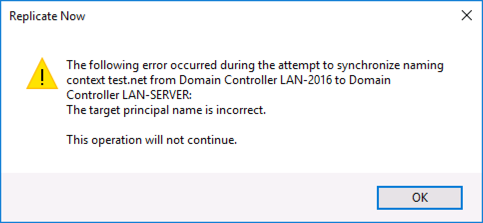
Cause: Either when attempting a manual domain replication or trying to access a resource on another machine.
1. If you are on a domain controller stop and disable the Key Distribution Center Service and stop it.
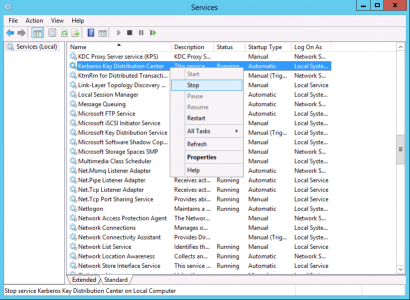
2. Start > Run > cmd {enter}.
3. Issue the following command;
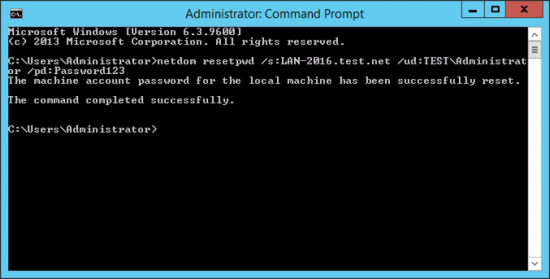
Where</br server=name of the PDC emulator domain = your domain name password123=the domain administrators password.
4. Reboot the Server.
5. If it’s a domain controller restart the Key Distribution Center service and set its start-up to automatic.
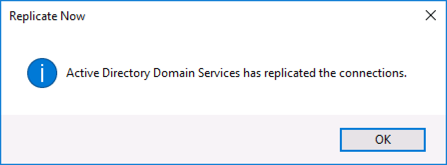
6. Retry replication.
Domain Replication Issues Possible Error 2 The RPC server is unavailable.
The time on both the domain controllers may be out of sync
1. Start > run > cmd {enter} > Issue the following command;
2. If it gives you a permission error the carry out the procedure under “Target principal name is incorrect” above to reset the machine password.
Ref: http://support.microsoft.com/kb/257187
Fix Replication Issues Possible Error 3 The time between replications with this source has exceeded the tombstone lifetime. Replication has been stopped with this source.
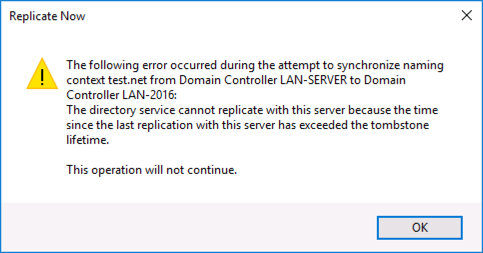
Cause: Replication has been offline for a long time.
1. Start > Run > regedit {enter}.
2. Navigate To:
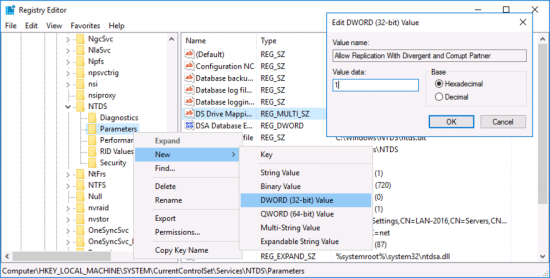
3. If the registry entry exists, modify it; otherwise create a new DWORD value by right-clicking Parameters.
4. Type Allow Replication With Divergent and Corrupt Partner and press Enter.
5. Double-click the entry and for the Value data type 1, then click OK.
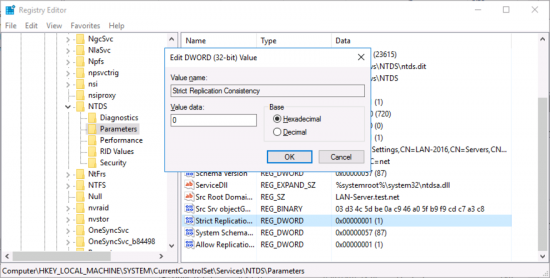
6. Locate the “Strict Replication Consistency Key” change its value from 1 to 0 (zero).
6. Close the registry editor. You do not need to reboot after this change.
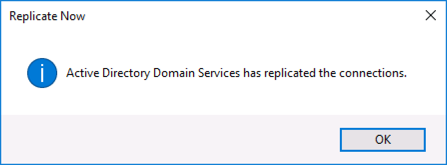
7. Retry Replication
Fix Replication Issues Possible Error 4 The destination server is currently rejecting replication requests.
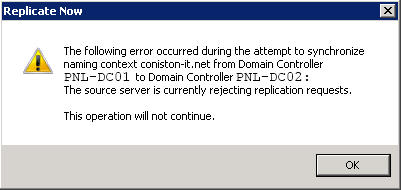
Cause: Sometimes (usually after many failures) A DC will stop accepting replication.
1. Start > Run > cmd {enter}.
2. Issue the following commands;
repadmin /options your-server-name +DISABLE_OUTBOUND_REPL
repadmin /options your-server-name -DISABLE_OUTBOUND_REPL
repadmin /options your-server-name +DISABLE_INBOUND_REPL
repadmin /options your-server-name -DISABLE_INBOUND_REPL
Fix Replication Issues Possible Error 5 This object may not exist because it may have been deleted and already garbage collected.
1. Start Run Regedit
2. Navigate to;
3. If “Strict Replication Consistency does NOT exist > Click Add Value on the Edit menu > Add REG_DWORD > Strict Replication Consistency
4. Value data: If the value is 1, change it to 0.
Fix Replication Event ID Errors
Event 1388 or 1988 (A lingering object is detected).
1. Start > run > cmd {enter}
2. Issue the following command;
Event ID 1113 and 1115 the destination server is currently rejecting replication requests.
1. See Possible Error 4 Above
When the problem has been rectified
Finish up by performing a Metadata cleanup on Active Directory
Remove Failed DC from Active Directory
Related Articles, References, Credits, or External Links
NA
