
KB ID 0000572
Problem
Note: This procedure allows you to reset the password WITHOUT LOSING THE CONFIG
You need to access a Cisco ASA device and do not have the passwords, there can be lots of reasons for this, lack of good documentation, bought a second hand firewall, the last firewall admin never told anyone etc.
This method does require physical access to the ASA, a console cable, and a machine running some terminal emulation software.
Note: This procedure is for Cisco ASA 5500-X and ASA 5500 Firewalls, for Cisco PIX go here, and Cisco Catalyst go here.
Password Recovery ASA5505-X
Password Recovery ASA 5500
Password Recovery / Reset Procedure for ASA 5500-X/5500 Firewalls
Below is a run though on changing the Cisco ASA passwords (setting them to blank then changing them to something else). Basically you boot the ASA to its very basic shell operating system (ROMMON) then force it to reboot without loading its configuration. At this point you can load the config, without having to enter a password, manually change all the passwords, and finally set the ASA to boot properly again.
Below I’ve used both HyperTerminal and Putty to do the same thing, you can use either, or another terminal emulation piece of software, the procedure is the same.
1. Connect to the the ASA via a console cable (settings 9600/8/None/1/None).
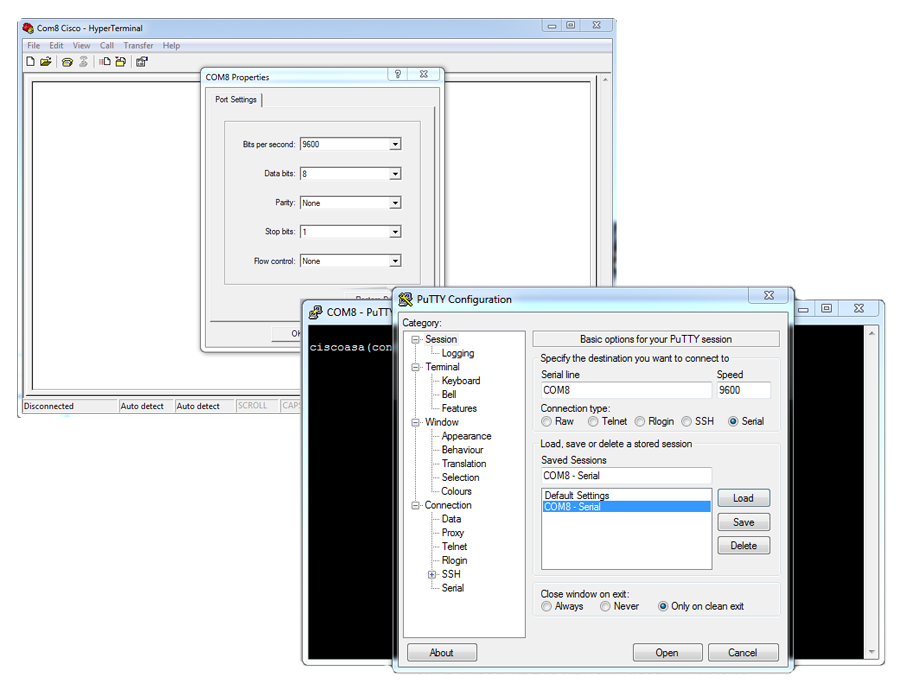
2. Reboot the ASA, and as it boots press Esc to interrupt the normal boot sequence and boot to ROMMON mode.
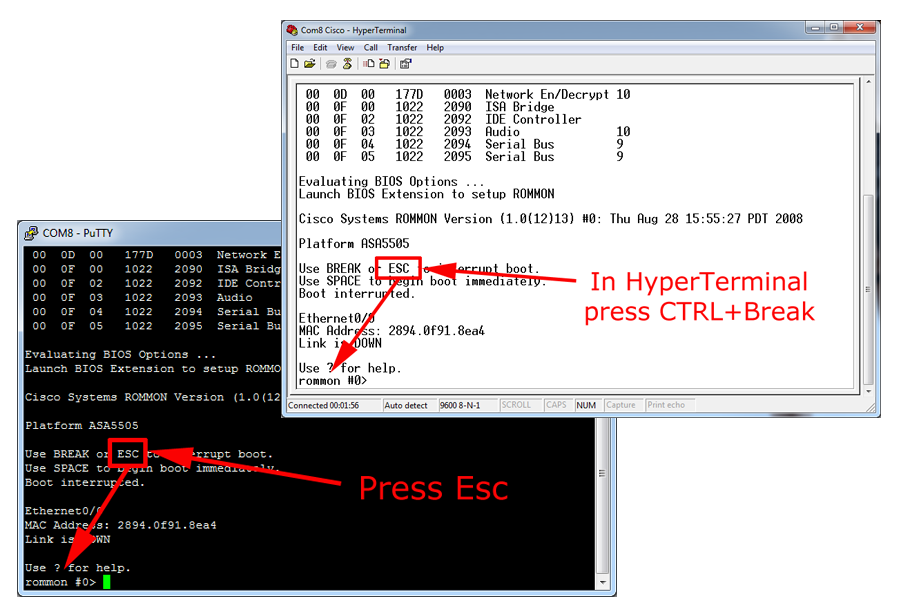
3. Execute the “confreg” command and take a note of the number that’s listed (copy it to notepad to be on the safe side).

4. Answer the questions as follows (Note: Just pressing Enter will supply the default answer). Answer no to all apart from the TWO listed below:
ON AN ASA 5500-X (Slightly Different)
do you wish to change the configuration? y/n [n]: Y <<< THIS ONE
disable “password recovery”? y/n [n]: n
disable “display break prompt”? y/n [n]: n
enable “ignore system configuration”? y/n [n]: Y <<< AND THIS ONE
disable “auto-boot image in disks”? y/n [n]: n
change console baud rate? y/n [n]: n
select specific image in disks to boot? y/n [n]: n
ON AN ASA 5500
Do you wish to change this configuration? y/n [n]: Y <<< THIS ONE
enable boot to ROMMON prompt? y/n [n]:
enable TFTP netboot? y/n [n]:
enable Flash boot? y/n [n]:
select specific Flash image index? y/n [n]:
disable system configuration? y/n [n]: Y <<< AND THIS ONE
go to ROMMON prompt if netboot fails? y/n [n]:
enable passing NVRAM file specs in auto-boot mode? y/n [n]:
disable display of BREAK or ESC key prompt during auto-boot? y/n [n]:

5. You may notice, that the configuration register has changed, on an ASA 5500 to 0x00000040, or on an ASA5505-X to 0x00000041, to boot the firewall execute the “boot” command.

6. This time when the ASA boots it will start with a {blank} enable password, you can load the normal config into memory with a “copy startup-config running-config” command.
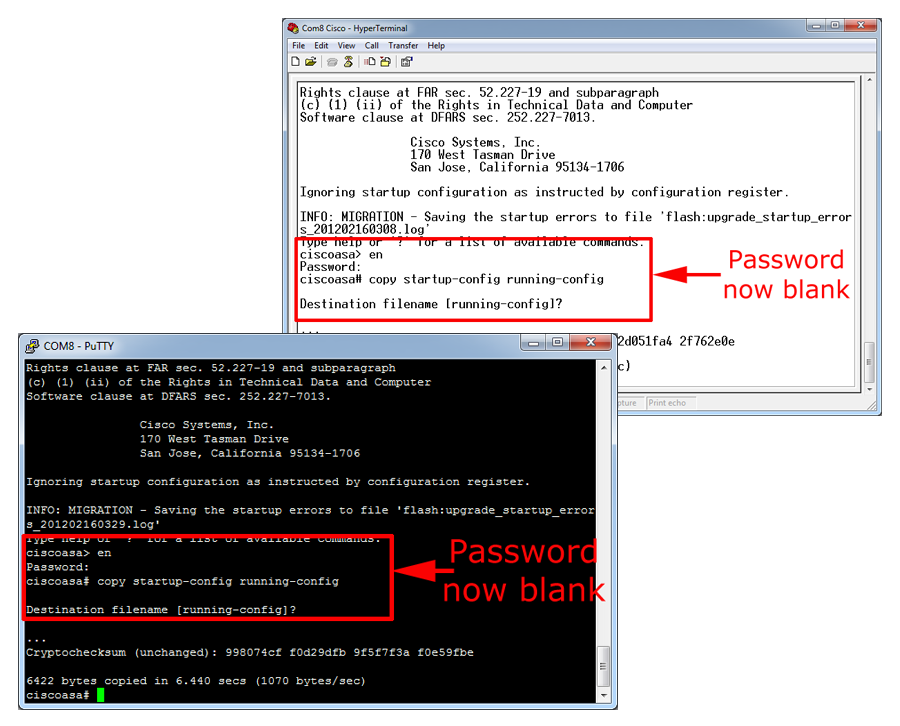
7. Now you are in enable mode with the correct config loaded, you can change the passwords, and once completed, change the configuration register setting back with a config-register {paste in the number you saved earlier} command, or simply a no config-register command. Save the changes, (write mem) and reboot the firewall.

Related Articles, References, Credits, or External Links
Cisco Catalyst Password Recovery / Reset
Cisco PIX (500 Series) Password Recovery / Reset
Cisco Router – Password Recovery /Bypass
