
KB ID 0000316
Problem
Assuming you have a working ASA 5500 and you want to add a DMZ to it, this is the process.
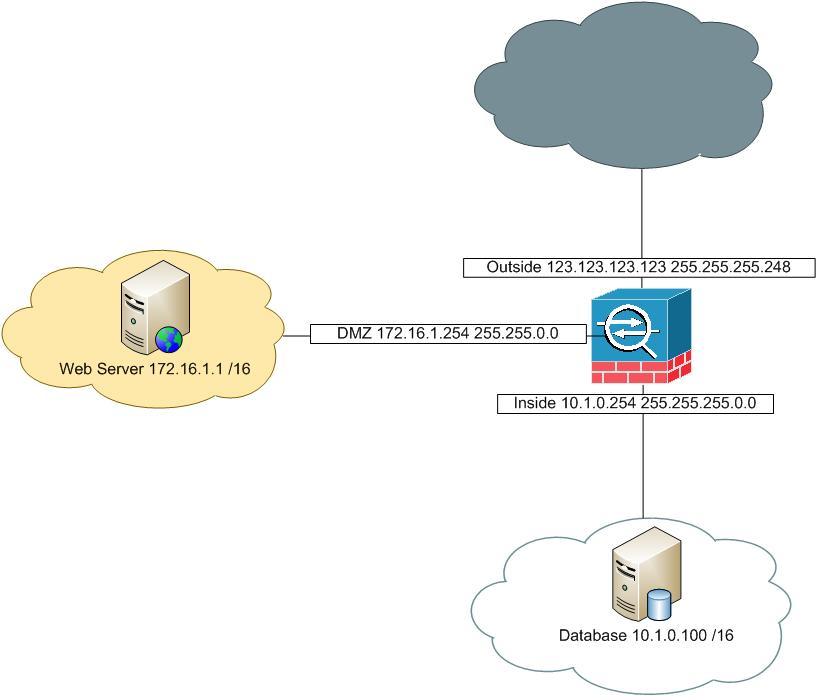
Assumptions
1. Networks,
a. Inside network is 10.1.0.0 255.255.0.0 b. Outside network is 123.123.123.120 255.255.255.248 c. DMZ network is 172.16.1.0 255.255.0.0
2. Interfaces,
a. Inside Interface is 10.1.0.254 b. Outside Interface is 172.16.1.254 c. DMZ Interface is 172.16.1.254
3. The Web server in the DMZ will have the following IP addresses,
a. DMZ IP address 172.16.1.1 b. Public IP address 123.123.123.124
4. From the Internet you want to allow web traffic and secure web traffic (http/www and https/ssl) to the DMZ Server.
5. The DMZ Server needs to speak to a database server on the inside LAN, on TCP port 1433.
Solution
Step 1: Setup the DMZ Interface
1. Firstly connect to the ASA log in and go to enable mode.
User Access Verification

Password:
Type help or '?' for a list of available commands.
PetesASA> enable
Password: ********
2. Go to configure terminal mode and set up the DMZ interface (In this case Ethernet0/2).
PetesASA# configure terminal
PetesASA(config)# interface Ethernet0/2
PetesASA(config-if)# nameif DMZ
PetesASA(config-if)# security-level 50
PetesASA(config-if)# ip address 172.16.1.254 255.255.0.0
PetesASA(config-if)# no shutdown
PetesASA(config-if)# exit
Step 2: Setup the DMZ NAT
Before we worry about the NAT, we need to find out what version of code the ASA is running, (configuration of NAT changes in version 8.3).
Find out your Cisco ASA version (Operating system and ASDM)
ASA Version 8.3 and Newer DMZ NAT
1. Allow the IP addresses in the DMZ to be NATTED to the outside IP address, (we will set up a static translation for the DMZ host in a minute).
PetesASA(config)# object network DMZ-subnet
PetesASA(config-network-object)# subnet 172.16.1.0 255.255.0.0
PetesASA(config-network-object)# nat (DMZ,outside) dynamic interface
PetesASA(config-network-object)# exit
PetesASA(config)#
2. Specify the public IP of the DMZ host.
PetesASA(config)# object network DMZ-Host-EXT
PetesASA(config-network-object)# host 123.123.123.124
PetesASA(config-network-object)# exit
PetesASA(config)#
3. Create a static NAT translation for the public ip of the DMZ host, to its private IP.
PetesASA(config)# object network DMZ-Host-INT
PetesASA(config-network-object)# host 172.16.1.1
PetesASA(config-network-object)# nat (DMZ,outside) static DMZ-Host-EXT
PetesASA(config-network-object)# exit
PetesASA(config)#
ASA Version 8.2 and Older DMZ NAT
1. I like to name the DMZ entities IP addresses so things look neat.
PetesASA(config)# name 172.16.1.1 DMZ-Host-Private-IP
PetesASA(config)# name 123.123.123.124 DMZ-Host-Public-IP2. Set a some NAT statement to handle traffic flow. (assuming you have a matching global statement like global (outside) 1 xxx - "show run global" will tell you).
PetesASA(config)# nat (DMZ) 1 0.0.0.0 0.0.0.0Note We are only going to have one DMZ host, and it will have a static mapping – if you had many DMZ hosts then also add “global (DMZ) 1 interface”.
3. Now add some static mappings.
PetesASA(config)# static (DMZ,outside) DMZ-Host-Public-IP DMZ-Host-Private-IP netmask 255.255.255.255
PetesASA(config)# static (inside,DMZ) 10.1.0.0 10.1.0.0 netmask 255.255.0.0
PetesASA(config)# static (inside,DMZ) 172.16.1.0 172.16.1.0 netmask 255.255.255.0
Step 4: Create ACL’s to Allow Traffic
Once again there’s a slight change in the syntax based on the ASA version, after version 8.3 you allow access to the ‘Pre-Natted’ address, but before version 8.3 you allowed access to the ‘Post-Natted’ address.
ASA Version 8.3 and Newer Access Lists
1. To let people from outside you need to either create an access-list or add some rules to any existing inbound access-list. (“show run access-group” will tell you, look for an ACL applies “in” to the outside interface e.g. “access-group outbound in interface inside”. We will assume I don’t have one so I’ll need the access-group at the end..
PetesASA(config)# access-list inbound extended permit tcp any object DMZ-Host-INT eq www
PetesASA(config)# access-list inbound extended permit tcp any object DMZ-Host-INT eq https
PetesASA(config)# access-group inbound in interface outside
2. Now to allow the DMZ host to get to the database server I’m going to allow TCP 1433.
ASA Version 8.2 and Older Access Lists
1. To let people in from the outside you need to either create an access-list or add some rules to any existing inbound access-list. (“show run access-group” will tell you, look for an ACL applies “in” to the outside interface e.g. “access-group outbound in interface inside”. We will assume I don’t have one so I’ll need the access-group at the end.
Step 5: Save the changes
8. Finally save the configuration.
PetesASA(config)#
write mem
Building configuration...
Cryptochecksum: 5417d5a1 bee8b082 16c6f19d b3839f139379 bytes copied in 1.410 secs (9379 bytes/sec)
[OK]
Related Articles, References, Credits, or External Links
Original Article Written 27/08/10
