|
||
| KB | 0000314 | |
| Dated | 05/07/11 | |
| Revision | 0.5 | |
Adding Drivers to Images on Windows Deployment Services
|
||
Problem |
||
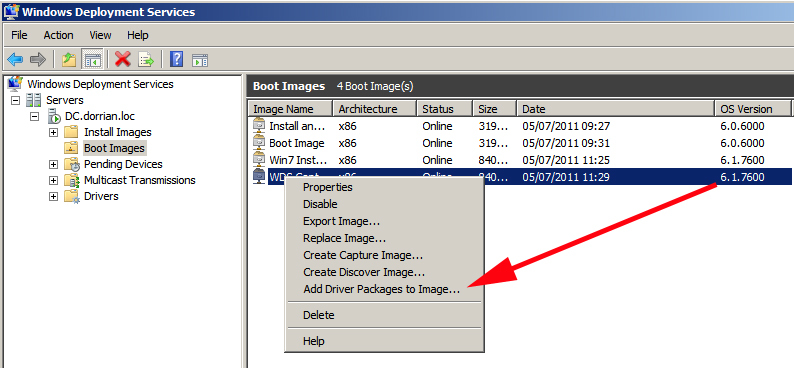
Before Server 2008 R2 when we needed to inject drivers into our WDS images we had to do it like this. Now however the process is a lot more elegant! Simply import the drivers into WDS, then inject them into the boot images (Yes the boot images NOT the Windows Images you are deploying!) |
||
Solution |
||
|
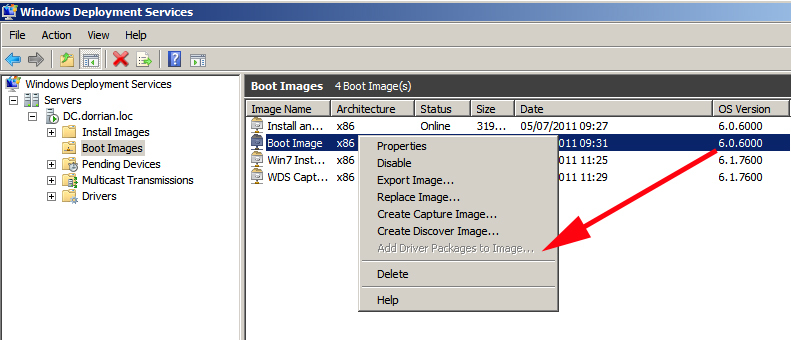
Add Driver Packages to Image is "Greyed out"If while attempting to add drivers, the option to "Add Driver Packages to Image" is grayed out. Then you may need to update your boot images from Server 2008/Vista images to 2008 R2/Windows 7 Images. (or from version 6.0.6000 to 6.1.7600). |
||
If this post helped you, PLEASE take the time to +1 it.
Please be aware, all information is provided free, but it does cost me to have this site hosted, if I've helped you in any way, or saved you some time/cost please take time to make a donation. If you have anything to add to an article, or have an article you would like us to publish please feel free to contact PeteNetLive. (Please be aware I get a LOT of email, I cannot assist and fix everyone's problems, please do not be offended if you do not get a response). |
||
| References - Credits - Or External Links | ||
| Thanks to Andy Dorrian for the update. | ||