
KB ID 0000309
Problem
By default, your remote VPN clients will timeout their connections after 300 seconds of inactivity, should you wish to increase that you can, on a user by user basis, however sometimes that does not work. To fix the problem you need to disable ISAKMP monitoring at the “Head End”.
Solution
Enable via Command Line
(see below for ASDM instructions)
1. Connect to the the firewall (see here for instructions).
2. Login and go to enable mode.
User Access Verification
Password: Type help or ‘?’ for a list of available commands. PetesASA> en Password: ********
3. We need to change the remote access IPSEC VPN tunnel group, to find out what its called issue a “show running-config tunnel-group” command.
The tunnel group we want will have an “ipsec-attributes” entry AND a “remote-access” entry, so in the example below the tunnel group we want is called “IPSEC-VPN-GROUP” (Yours may not be as well named!).
PetesASA# show running-config tunnel-group
tunnel-group IPSEC-VPN-GROUP type remote-access <<< Here's a remote access group
tunnel-group IPSEC-VPN-GROUP general-attributes
address-pool IPSEC-VPN-DHCP-POOL
authentication-server-group PNL-KERBEROS LOCAL
default-group-policy IPSEC-VPN-POLICY
tunnel-group IPSEC-VPN-GROUP ipsec-attributes <<< Its an IPSEC tunnel :)
pre-shared-key *****
tunnel-group SSL-VPN-POLICY type remote-access <<< Here's a remote access group
tunnel-group SSL-VPN-POLICY general-attributes
address-pool SSL-VPN-DHCP-POOL
default-group-policy SSL-VPN-GROUP-POLICY
tunnel-group SSL-VPN-POLICY webvpn-attributes <<< this ones an SSL group :(
group-alias PNL enable
PetesASA#
4. Enter configuration mode (conf t) > Then to add the new attribute issue a “tunnel-group {tunnel group name} ipsec-attributes” > then to disable the keepalives, issue the following command “isakmp keepalive threshold infinite“.
Finally save your hard work with a “write mem” command.
PetesASA# conf t PetesASA(config)# tunnel-group IPSEC-VPN-GROUP ipsec-attributes PetesASA(config-tunnel-ipsec)# isakmp keepalive threshold infinite PetesASA(config-tunnel-ipsec)# PetesASA(config-tunnel-ipsec)# write mem Building configuration… Cryptochecksum: 5417d5a1 bee8b082 16c6f19d b3839f13
9379 bytes copied in 1.410 secs (9379 bytes/sec) [OK] PetesASA(config-tunnel-ipsec)#
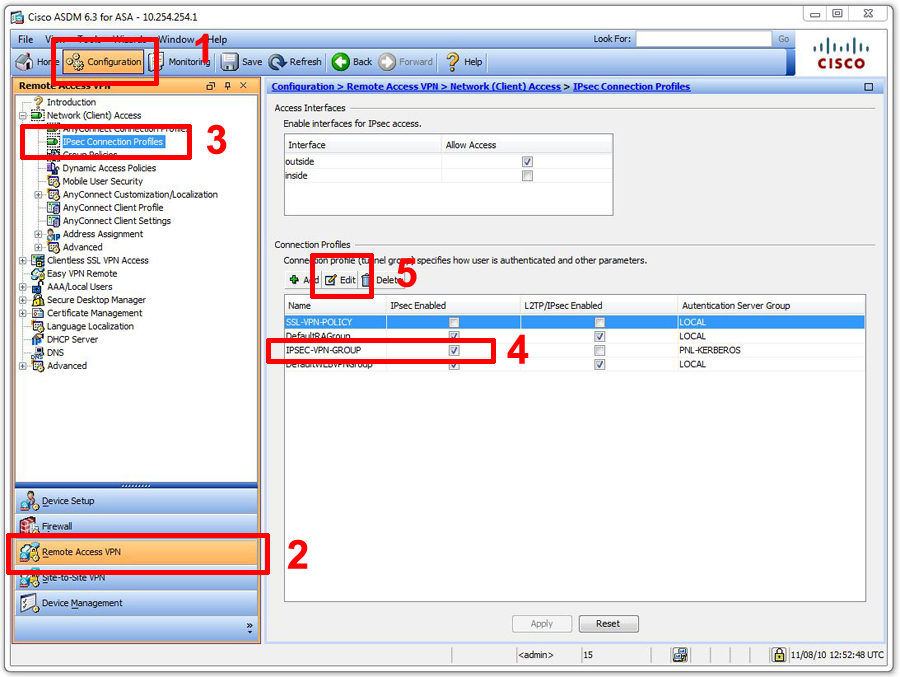
2. Click Configuration > Remote Access VPN > IPSEC Connection Profiles > {Your IPSEC Policy} > Edit.
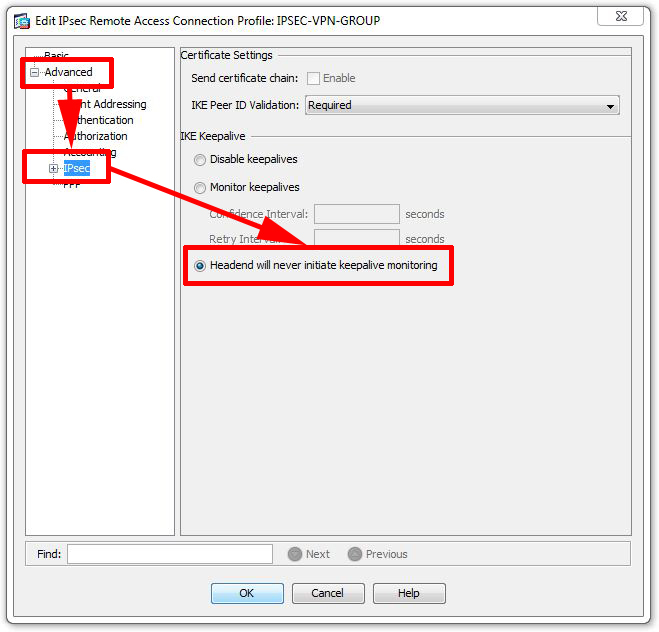
2. Select Advanced > IPSEC > and tick “Headend will never initiate keepalive monitoring” > OK > Apply.
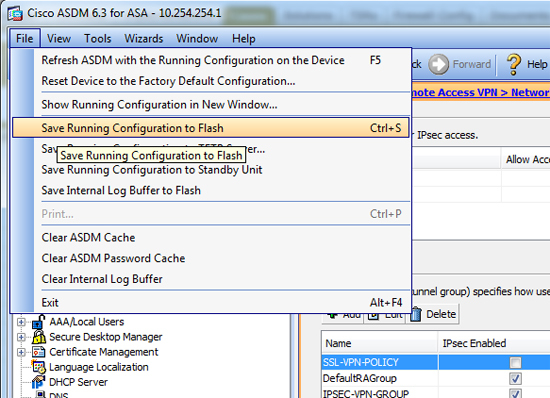
3. Finally click File > “Save Running Configuration to Flash”.
Related Articles, References, Credits, or External Links
NA
