
KB ID 0000196
Problem
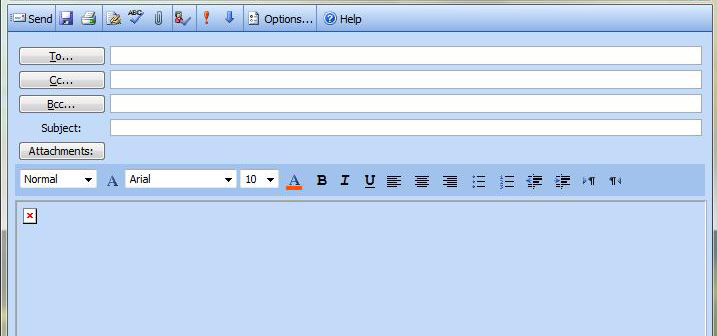
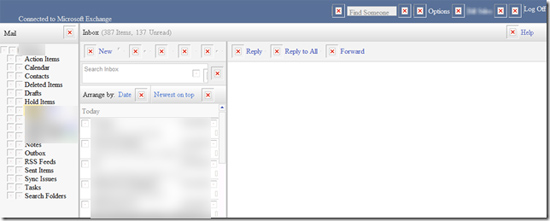
Usually seen on IE7 and IE8, when you try and reply to an email you see a red X in the body of the Email window.
Solution
Option 1: The simplest fix (Exchange 2000/2003 only – Including SBS2003).
1. Go to http://support.microsoft.com/?kbid=911829 and install that hot fix on the server.
Note: This also fixes the error where OWA simply says “Loading”.
Option 2 : Whilst In OWA
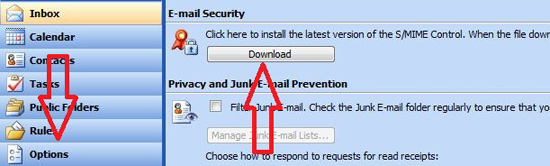
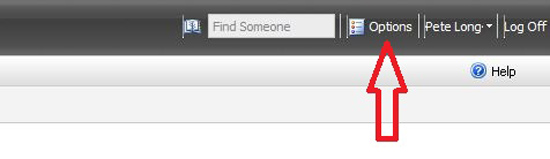
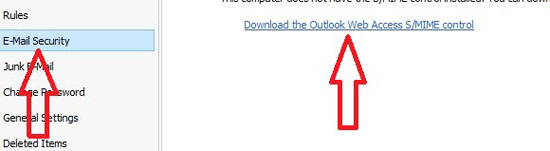
1. Click Options > Scroll Down to EMail Security > Download > Run > Restart the browser.
OR
Options 3 – Check permissions (Exchange 2003 Only)
1. On the Exchange server open Windows Explorer.
2. Navigate to c:program filesExchsrvrexchweb
3. Locate the “img” folder > Right click > Properties > Untick hidden > Apply > OK.
Option 4 – Re-register some files (Exchange 2003 Only)
1. Click Start > Run > cmd {enter}
2. Enter the following commands.
regsvr32 “C:Program FilesCommon FilesMicrosoft SharedTriedittriedit.dll”
regsvr32 “C:Program FilesCommon FilesMicrosoft SharedTrieditdhtmled.ocx”
3. If the above errors, then copy these two files from a known working machine. You can also try copying them from a known working machine, even if you do not recieve an error.
Note: Internet Explorer 6 users make sure you have this update.
Note2: SBS2008 Users if you have multiple “Red X’s” on your OWA Page, then install the latest Exchange 2007 roll up package.
Related Articles, References, Credits, or External Links
NA
