
Event ID 12014
KB ID 0000174
Problem
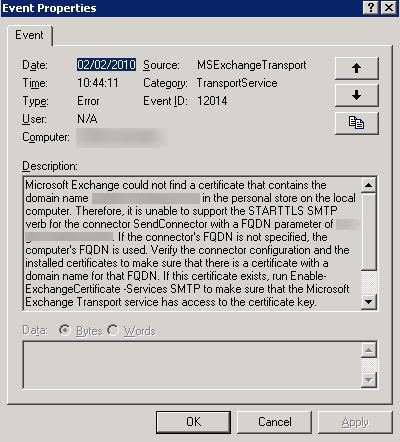
Event ID 12014
Microsoft Exchange could not find a certificate that contains the domain name {name.domain.com} in the personal store on the local computer. Therefore, it is unable to support the STARTTLS SMTP verb for the connector SendConnector with a FQDN parameter of {name.domain.com}. If the connector’s FQDN is not specified, the computer’s FQDN is used. Verify the connector configuration and the installed certificates to make sure that there is a certificate with a domain name for that FQDN. If this certificate exists, run Enable-ExchangeCertificate -Services SMTP to make sure that the Microsoft Exchange Transport service has access to the certificate key.
In the error massage take note of {name.domain.com} this name is being used on one of your mail connectors, and the certificate on the Exchange server has a different name.
Solution
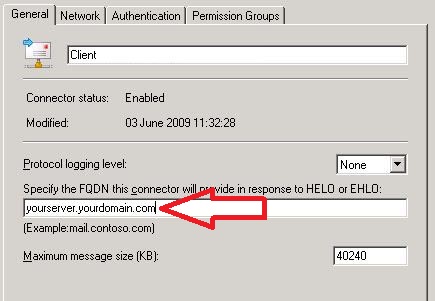
1. Launch Exchange Management Console > Organization Configuration > Hub Transport > Send Connectors > Right click your Send connector > Properties > Make sure the “Specify the FQDN this connector will provide…” section is the same as the name on your servers certificate.
2. Launch Exchange Management Console > Server Configuration > Hub Transport > Receive Connectors > Right click your Send connector > Properties > Make sure the “Specify the FQDN this connector will provide…” section is the same as the name on your servers certificate.
3. Start > run > services.msc {enter} > Restart the Microsoft Exchange Active Directory Topology Service > Select “Yes” to restart the other services.
Related Articles, References, Credits, or External Links
NA
