
Domain Time KB ID 0000112
Problem
If you have arrived here, you have either noticed that the time is wrong on your server(s) or client PC(s), or you have looked in the event viewer and seen one of the following events being logged. Event ID’s 12, 22, 29, 36, 38, 47, and 50.
Time Problem Events – On the PDC Emulator
Event ID 12 (W32 Time Time Provider NtpClient: This machine is configured to use {text omitted}, but it is the PDC emulator…).
Event ID 29 (The time provider NtpClient is configured to acquire time from one or more time sources…).
Event ID 36 (The time service has not synchronized the system time for 86400 seconds…).
Event ID 38 (The time provider NtpClient cannot reach or is currently receiving invalid time data from…).
Event ID 47 (Time Provider NtpClient: No valid response has been received from manually configured peer…).
Domain Time Problem Events – On Domain Members
Event ID 50 (The time service detected a time difference of greater than 5000 milliseconds for 900 seconds…).
Event ID 22 (The time provider NtpServer encountered an error while digitally signing the NTP response for peer…).
Solution : Domain Time Problems
Setting domain time is a TWO-STEP process, set the time correctly on the PDC emulator, then let the clients take their time from the PDC emulator.
Locate the PDC Emulator
1. On a domain controller, Windows Key+R > netdom query fsmo {Enter}.
2. Take note of the PDC name and go to that server.
NTP Firewall config (Domain Time)
1. Ensure UDP Port 123 is open outbound from the PDC Emulator. How this is done will vary depending on your firewall vendor. If you have a Cisco ASA or a Cisco PIX see my article here.
To Test Use NTPTool
Below either the port is blocked (or the hostname/IP of the external NTP server is incorrect);

This is how it should look, every-time you press query you should get a response, now you know the correct port is open;

Configure the PDC Emulator to collect Reliable Domain Time
There’s two ways to do this, 1. Use Group Policy, and 2. Use command line.
Setting PDC Emulator Time With Group Policy
Of course our PDC Emulator is also a domain controller, so we need to link a GPO to the domain controllers OU. But we dont want all DC’s getting their time from an external source, so we will create a WMI filter to ensure the policy will only apply to the PDC emulator server.
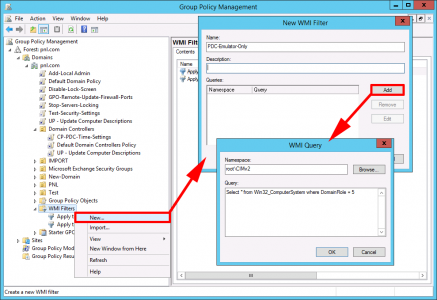
Administrative tools > Group Policy Management > WMI Filter > New > PDC-Emulator-Only > Add > Select * from Win32_ComputerSystem where DomainRole = 5 > OK.
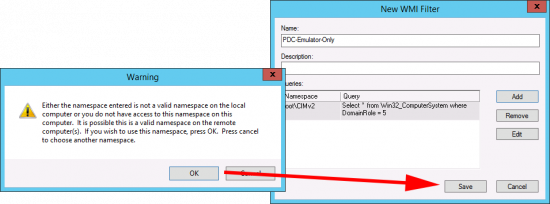
Don’t panic if you see this error > OK > Save.
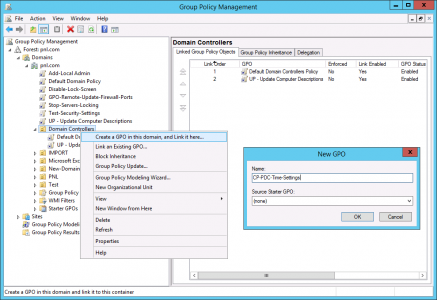
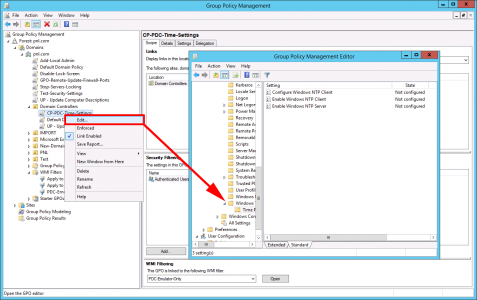
Create a new GPO linked to the Domain Controllers OU.
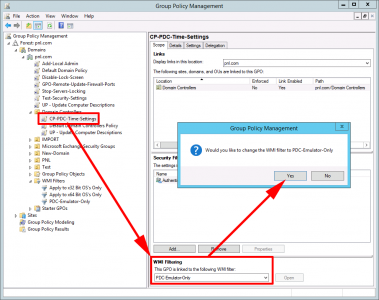
Change the policy so it uses your WMI filter;
Edit The Policy, and navigate to;
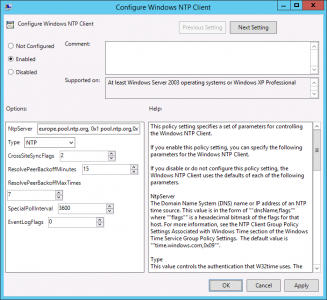
Configure Windows NTP Client
Enable the policy > set the NtpServer setting to server-name(comma)stratum-type(space). If you get this wrong you wont sync, and you will see this error.
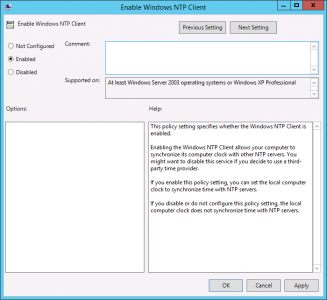
Enable Windows NTP Client
Enable the Policy (The server still needs to get its time from the external source!)
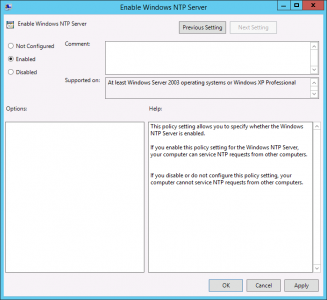
Enable Windows NTP Server
Enable the policy (The server also needs to provide time to the domain clients).
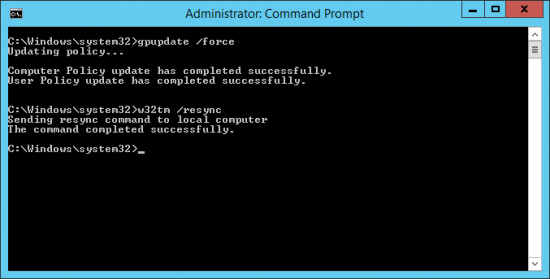
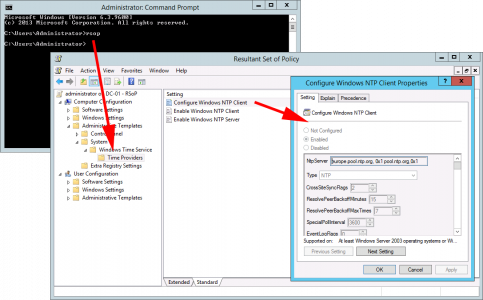
Save and exit the policy editor, then on the PDC emulator force a policy update and resync the time. Finally run rsop to make sure the settings have applied.
Setting PDC Emulator Time From Command Line
1. On the PDC emulator Windows Key+R > cmd {Enter}.
2. At command line execute the following four commands;
w32tm /config /manualpeerlist:ntp2d.mcc.ac.uk /syncfromflags:manual /reliable:yes /update

net stop "windows time"

net start "windows time"

w32tm /resync

Note: If you are NOT in the UK or simply want to use a different NTP time server go here for alternatives.
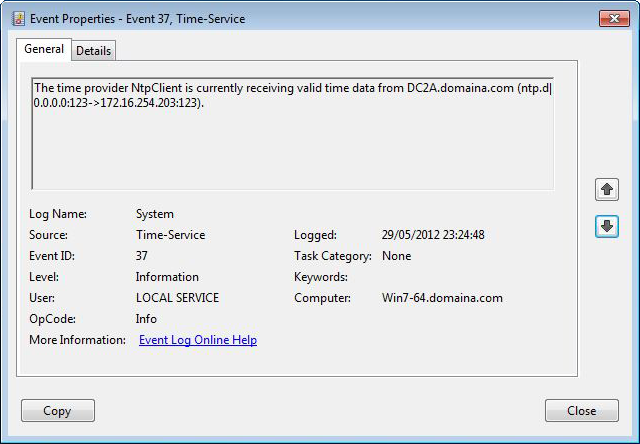
3. Look in the servers Event log > System Log for Event ID 37.

---------------------------------------------------------------
Event Type: Information
Event Source: W32Time
Event Category: None
Event ID: 37
Date: xx/xx/xxxx
Time: xx:xx:xx
User: N/A
Computer: {servername}
Description:
The time provider NtpClient is currently receiving valid time
data from ntp2d.mcc.ac.uk (ntp.m|0x0|10.0.0.1:123->130.88.203.64:123).
For more information, see Help and Support Center at http://go.microsoft.com/fwlink/events.asp. —————————————————————
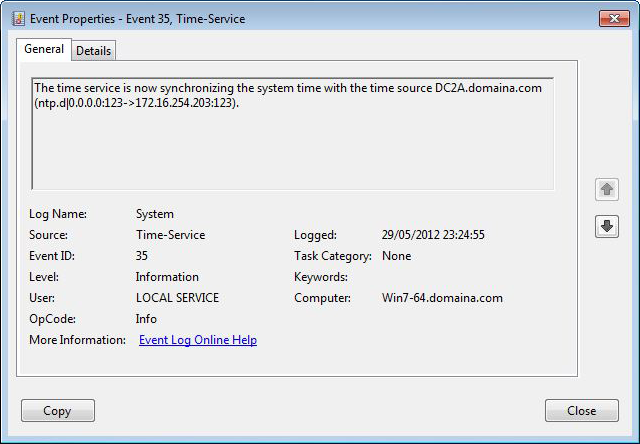
4. You will also see Event ID 35.

---------------------------------------------------------------
Event Type: Information
Event Source: W32Time
Event Category: None
Event ID: 35
Date: xx/xx/xxxx
Time: xx:xx:xx
User: N/A
Computer: {servername}
Description:
The time service is now synchronizing the system time with the time source
ntp2d.mcc.ac.uk (ntp.m|0x0|10.0.0.1:123->130.88.203.64:123).
For more information, see Help and Support Center at http://go.microsoft.com/fwlink/events.asp. —————————————————————
Step 2 Check the domain clients
This is all you should need to do, because, (by default) all Domain clients get their time from the PDC when they log on, but to check;
1. Windows Key+R > cmd {enter}.
2. Execute the following command;
3. You will see the time this client can see, on all the domain controllers.
C:Documents and SettingsAdministrator.yourdomain>w32tm /monitor
server-dc.yourdomain.co.uk [192.168.1.1]:
ICMP: 0ms delay.
NTP: +363.2032725s offset from server-pdc.yourdomain.co.uk
RefID: server-pdc.yourdomain.co.uk [192.168.69.6]
site2-dc.yourdomain.co.uk [192.168.2.1]:
ICMP: 70ms delay.
NTP: +0.0470237s offset from server-pdc.yourdomain.co.uk
RefID: dc.yourdomain.co.uk [192.168.69.4]
serverdc2.yourdomain.co.uk [192.168.1.4]:
ICMP: 0ms delay.
NTP: +0.0000553s offset from server-pdc.yourdomain.co.uk
RefID: server-pdc.yourdomain.co.uk [192.168.1.6]
server-pdc.yourdomain.co.uk *** PDC *** [192.168.1.6]:
ICMP: 0ms delay.
NTP: +0.0000000s offset from server-pdc.yourdomain.co.uk
RefID: scarp.mc.man.ac.uk [130.88.203.64]
(In the case above the time on server-dc is way out, address that first – (it was an old Windows 2000 server and running “net time server-pdc” {enter} fixed it).
4. Once all the domain controllers have a time that’s accurate (like the last three in the example above), then proceed.
5. Execute the following commands on a client machine;
net stop "windows time"

net start "windows time"

w32tm /resync
6. The machines event log should show the following successful events;
Event ID 37 (The time provider NtpClient is currently receiving valid time data from..).
Event ID 35 (The time provider NtpClient is currently receiving valid time data from..).
Setting Domain Clients Time via GPO
As already outlined you should not need to do this, (as it’s the default setting,) but if there’s a problem you can force domain clients to look at your PDC emulator for reliable time.
Create a GPO, and link it to the OU containing the computers you want to sync’
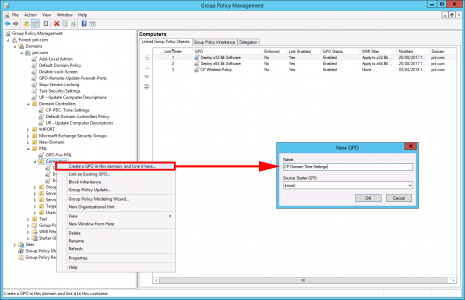
Edit the policy and navigate to;
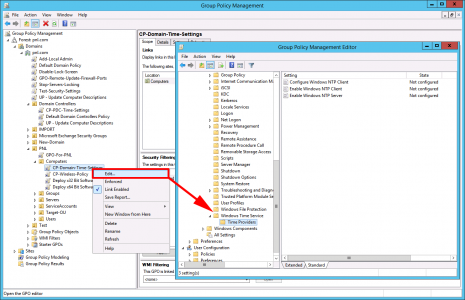
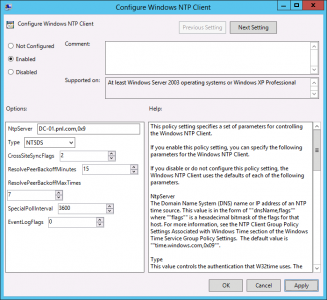
Configure Windows NTP Client
Enable the policy > Set the NtpServer to {Your-PDC-Name},0x9 > Set the Type to NT5DS.
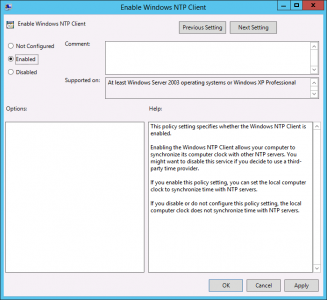
Enable Windows NTP Client
Enable this policy.
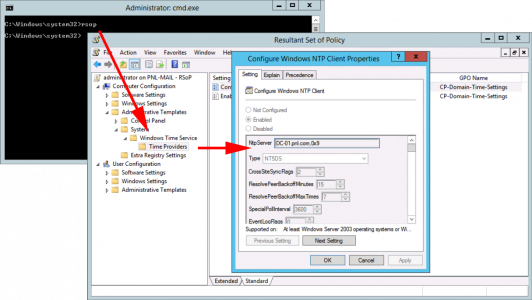
Testing Client NTP Settings
Either run;

Or run RSOP.
Related Articles, References, Credits, or External Links
PDC Emulator: PDC Emulator: Cannot Sync Time From External NTP Server
Cisco ASA – Configuring for NTP
