
KB ID 0000033
Problem
After renaming (because you didn’t want to lose the profile) or deleting a user profile, from the “users” directory. You will see the following error when you attempt to log on as the deleted user;

Error: You have been logged on with a temporary profile You cannot access your files and files created in this profile will be deleted when you log off. To fix this, log off and try logging on later. Please see the event log for details or contact your system administrator.
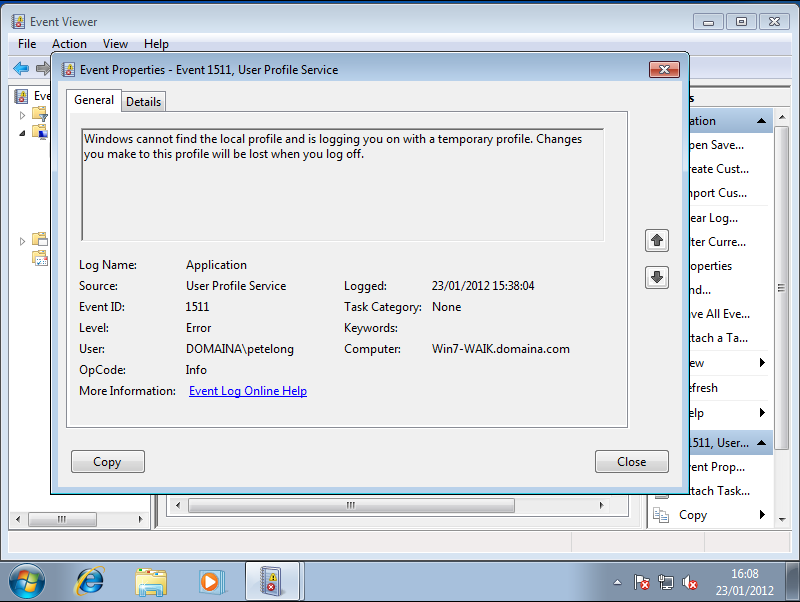
You will also see Event ID 1511 logged to the machines application log.
Solution
1. Log on to the machine with administrative rights.
2. Click Start > In the Start Search box type Regedit {enter}.
3. Navigate to;
4. Here you will see the SID (Security Identifier) for all the users on the machine, you will notice one has .bak on the end of it.
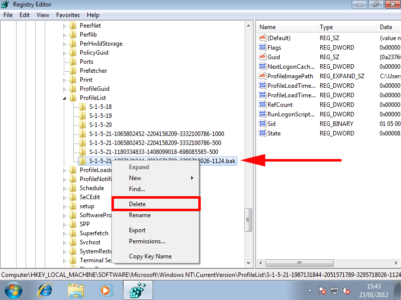
5. Delete the entire key that ends in .bak then reboot and log on as the user in question.
How to properly delete a user profile
Note: You might want to take a backup of the c:users{user_profile} folder first.
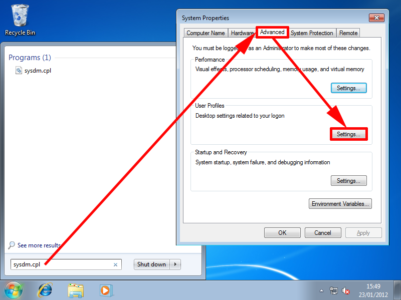
1. Click Start > in the Search/Run box type sysdm.cpl {enter} > Select the Advanced tab > User Profile Section > Settings.
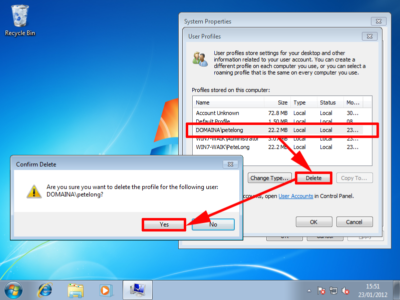
2. Locate the offending profile and select delete > then confirm.
Deleting Multiple Profiles
Update 28/01/13 (Email form Rick Sparrow)
If you have several profiles to remove, this method can be quite time consuming. There is a command line utility called delprof2 that works the same as Microsoft’s old delprof, but is compatible with Windows 7. You can remove all inactive profiles instead of one at a time.
Related Articles, References, Credits, or External Links
Original article written: 23/05/09
Thanks to Rick Sparrow for the feedback.
