
KB ID 0000635
Problem
My colleague was setting up a DMZ server for one of our clients, it was a virtual server that was presented to the DMZ of a Cisco ASA 5510. Every time he gave it a static IP address it popped up an IP address conflict (no matter what the IP address was).
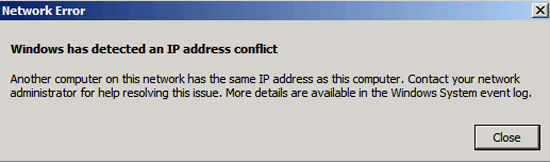
Windows has detected an IP address conflict
Another computer on this network has the same IP address as this computer. Contact your network administrator for help resolving this issue. More details are available in the Windows event log.
He asked me to set up DHCP for the DMZ to see if that would cure the problem, which I did. However that also refused to work either.
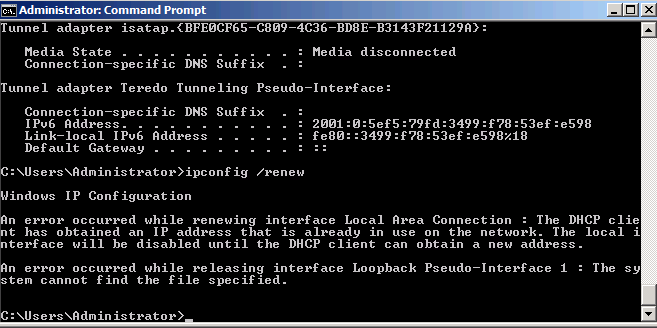
Windows IP Configuration
An error occurred while renewing interface Local Area Connection : The DHCP client has obtained an IP address that is already in use on the network. The local interface will be disabled until the DHCP client can obtain a new address.
An error occurred while releasing interface. Loopback Pseudo-Interface 1 : The system cannot find the file specified.
Solution
Turns out this is a known problem, and is pretty easy to rectify.
Option 1 (On the ASA)
1. Connect to the ASA via command line, log in and then go to enable mode
Password:******
Type help or '?' for a list of available commands.
PetesASA> enable
Password: ********
2. Enter configure terminal mode then disable proxy ARP on the interface that’s presented to the problem network, (in this case the interface is called DMZ).
PetesASA# configure terminal
PetesASA(config)# sysopt noproxyarp DMZ
3. Save the changes.
PetesASA# >write mem
Building configuration...
Cryptochecksum: 79745c0a 509726e5 b2c66028 021fdc7d

7424 bytes copied in 1.710 secs (7424 bytes/sec)
[OK]
PetesASA#Option 2 (On the affected machine)
Note: This is is for Windows based clients. 1. Start > Run > regedit {Enter}. 2. Navigate to;
HKEY_LOCAL_MACHINESYSTEMCurrentControlSetServicesTcpipParameters
3. Create a new DWORD value called ‘ArpRetryCount’ and set its value to 0 (Zero).

4. Reboot.
Related Articles, References, Credits, or External Links
NA
