
KB ID 0000602
Problem
I have a client who manages the network at a school. They wanted to stop the profiles of their users being cached, in either the c:documents and settings or c:users folders (depending on the version of Windows and profile the users were using).
Solution
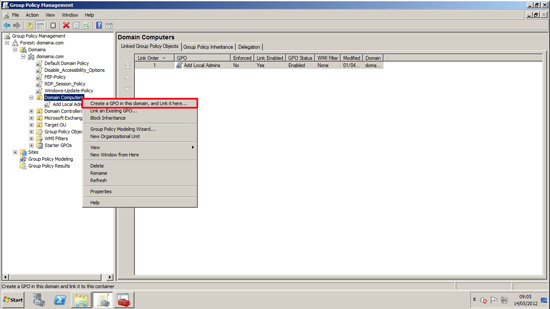
1. Log into a domain controller or a machine running the RSAT tools, Start > Administrative Tools > Group Policy Management > Either edit an existing group policy, or create a new one that is linked to your COMPUTERS.
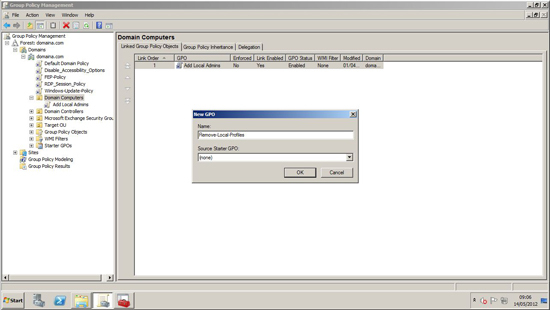
2. If creating new policy, give it a sensible name > OK
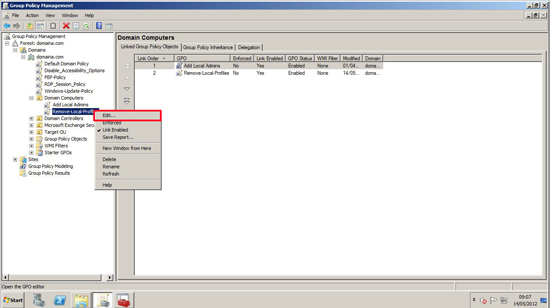
3. Edit the relevant policy.
4. Navigate to;
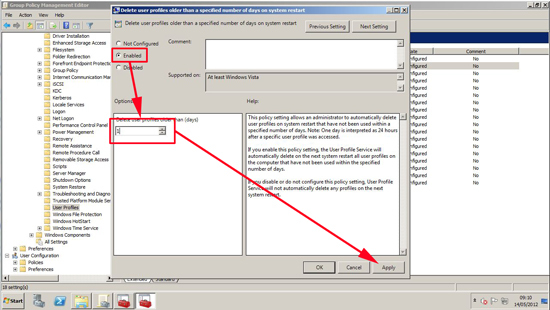
Locate and edit “Delete User Profiles older than a specified number of days on system restart”.
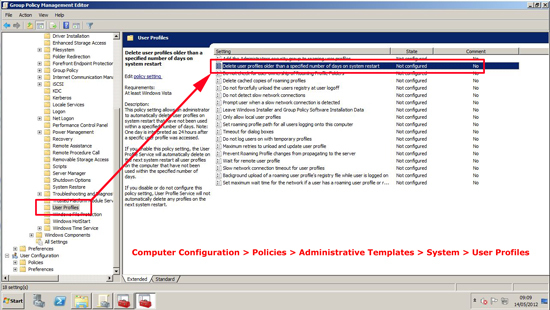
5. Enable the policy and set it to 1 (24 hours) > Apply > OK.
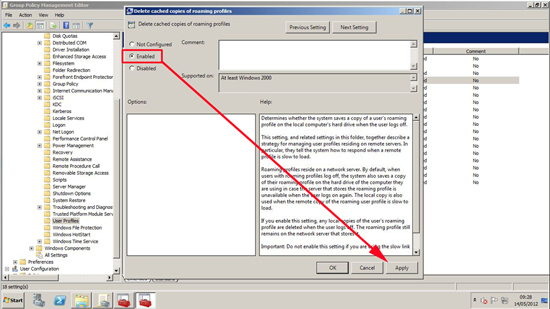
6. Then edit the “Delete cached copies of roaming profiles” and enable that policy. (This will stop the copies caching locally as the user logs on) > Apply > OK.
7. Close the policy editor. Then get the clients to reboot, wait a couple of hours, or manually run “gpupdate /force” on them.
Related Articles, References, Credits, or External Links
NA
