
KB ID 0000319
Problem
You have a Windows 2019/2016, 2012, or 2008 server with plenty of storage space, and you would like to present that to an ESX/ESXi server as a datastore. You can configure a folder (or drive) as an NFS share and present it to VMware vSphere, so that it can be used as a datastore.
Note: For Server 2008 and vSphere 4/5 Scroll down.
Create NFS Shares on Windows Server 2019, 2016, and 2012
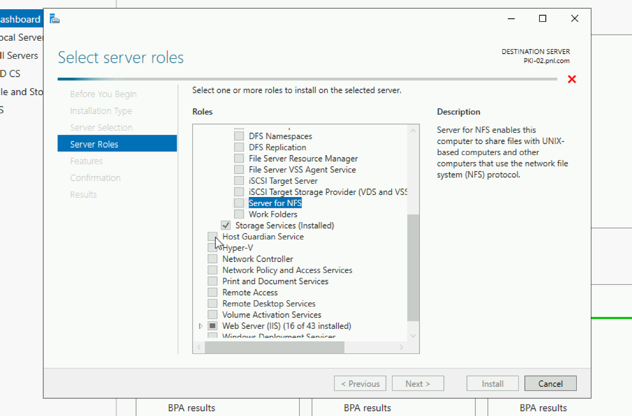
Essentially you need to add the ‘Server for NFS’ role, (Below “File and Storage Services“).
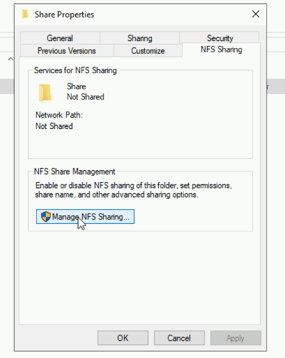
Create a folder to share, on its properties > NFS Sharing > Manage NFS Sharing.
Tick to share > Permissions.
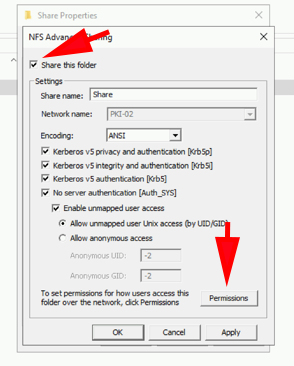
You can add each host individually here, but I’m just changing the default rule to allow Read/Write to ALL MACHINES > Tick ‘Allow root access’ > OK.

VMWare vSphere 6 Connecting to Windows NFS Shares
Make Sure you have a VMKernel port on the same network as your NFS share.

DataStore View > Right click the ‘Cluster‘ > Storage > New Datastore > NFS > Next > NFS 3 > Next.
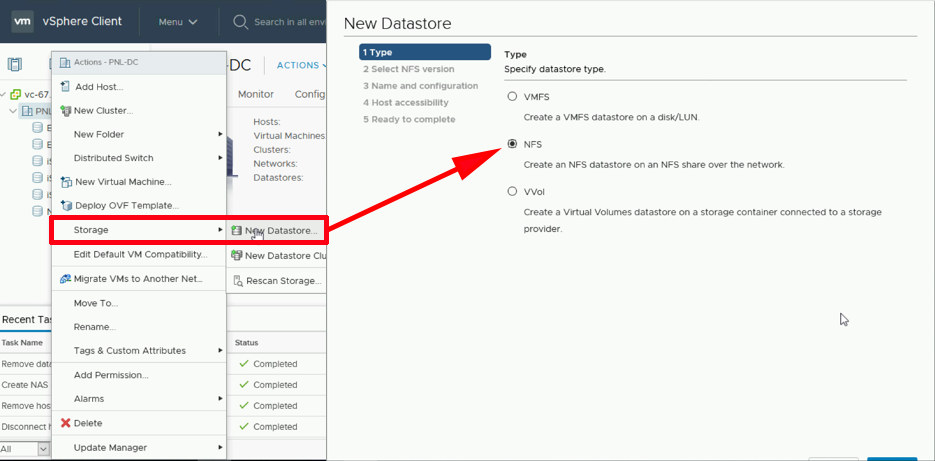
Give the datastore a name > Select the share name (prefix it with a forward slash, and remember they are case sensitive!) > Enter the IP or FQDN of the NFS server > Next > Next > Finish.

Create NFS Shares on Windows Server 2008
Gotchas
1. The system will not work if you do not have a vmkernel port, if you already have iSCSI or vmotion working then this will already be in place.
If not you will see an error like this,

Call “HostDatastoreSystem.CreateNasDatastore” for object “ha-datastoresystem” on ESX “{name or IP of ESX server}” failed.
2. Make sure TCP port 2049 is open between the NFS share and the ESX box. On an ESX 3.x servers you may need to run ” esxcfg-firewall -e nfsClient “.
Other Points
1. You CAN boot a windows VM from any NFS store (just because Windows cannot boot from NFS – does not mean a VM can’t).
2. NFS Datastores are limited to 16TB.
3. vSphere supports up to 64 NFS Datastores (ESX supports up to 32).
4. Thin provisioned disks will “re-expand” when moved/cloned to another NFS Datastore (THOUGH NOT in a vSphere environment).
5. On Server 2008 R2 NFS can only support 16 TCP connections, to raise the limit see here.
Related Articles, References, Credits, or External Links
NA
