
KB ID 0000214
Problem
Seen on SBS 2008 running McAfee AV
Seen on SBS 2008 running Trend AV
Problem reoccurs on a rough 5-7 days cycle, rebooting the server solves the problem.
You may also see
System Event Log:
Log Name:      System
Source:        Microsoft-Windows-GroupPolicy
Event ID:      1054
Level:         Error
User:          SYSTEM
Description:
The processing of Group Policy failed. Windows could not obtain the name of a
domain controller. This could be caused by a name resolution failure. Verify
your Domain Name System (DNS) is configured and working correctly.
DNS Server Event log:
Log Name:      DNS Server
Source:        Microsoft-Windows-DNS-Server-Service
Event ID:      408
Level:         Error
Description:
The DNS server could not open socket for address 0.0.0.0.

Verify that this is a valid IP address for the server computer.  If it is NOT
 valid use the Interfaces dialog under Server Properties in the DNS Manager to
 remove it from the list of IP interfaces.  Then stop and restart the DNS
server. (If this was the only IP interface on this machine and the DNS server
 may not have started as a result of this error.  In that case remove the
DNSParameters ListenAddress value in the services section of the registry
and restart.)
If this is a valid IP address for this machine, make sure that no other application (e.g. another DNS server) is running that would attempt to use the DNS port.
Log Name:      DNS Server
Source:        Microsoft-Windows-DNS-Server-Service
Event ID:      404
Level:         Error
Description:
The DNS server could not bind a Transmission Control Protocol (TCP) socket to
address 0.0.0.0.  The event data is the error code.  An IP address of 0.0.0.0
can indicate a valid "any address" configuration in which all configured IP
addresses on the computer are available for use.
Restart the DNS server or reboot the computer.
When trying to Open the Exchange Management Console
You will see the following error,
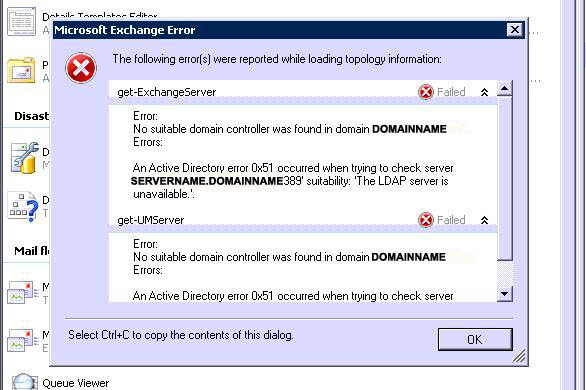
get-ExchangeServer Failed
Error:
No suitable domain controller was found in domain {your domain name}
Errors:
An Active Directory error 0x51 occurred when trying to check server
{your servername and your domain name} :389 suitability. The LDAP server is
unavailable.
Solution
It’s caused by a driver using the Transport Driver Interface, If you see this problem install this hotfix.
http://support.microsoft.com/hotfix/KBHotfix.aspx?kbnum=961775&kbln=en-us

Note: The hotfix is for both Server 2008 and Vista do not be alarmed!
Related Articles, References, Credits, or External Links
NA
