
KB ID 0000039
Problem
You want to set up a Cisco ASA to authenticate users (VPN access for example).
Solution
Kerberos can only be used as an authentication protocol on the ASA, so its fine for allowing VPN connections but not for assigning policies etc. To work both the ASA and the domain need to be showing accurate time.
Step 1: Set the ASA to get time from an External NTP Server
1. Log onto the ASA > Go to “Enable Mode” > Issue the following command;
User Access Verification

Password:
Type help or '?' for a list of available commands.
Petes-ASA> enable
Password: ********
Petes-ASA# configure terminal
Petes-ASA(config)# ntp server 130.88.212.143 source outside
Note that’s a public time server in the UK (Manchester University) that I use. you may want to use another.
2. To check the ASA has synchronised issue the a ‘show ntp status‘ command,
If you see a message like the following, go and have a coffee.
Petes-ASA(config)# show ntp status
Clock is unsynchronized, stratum 16, no reference clock
nominal freq is 99.9984 Hz, actual freq is 99.9984 Hz, precision is 2**6
reference time is 00000000.00000000 (06:28:16.000 UTC Thu Feb 7 2036)
clock offset is 0.0000 msec, root delay is 0.00 msec
root dispersion is 0.00 msec, peer dispersion is 0.00 msec
What you are looking for is "Clock is Syncronized"
Petes-ASA(config)# show ntp status
Clock is synchronized, stratum 3, reference is 130.88.212.143
nominal freq is 99.9984 Hz, actual freq is 99.9984 Hz, precision is 2**6
reference time is cdd7b741.119bcc72 (16:13:53.068 UTC Mon Jun 8 2009)
clock offset is 15.0836 msec, root delay is 56.50 msec
root dispersion is 15931.63 msec, peer dispersion is 15890.63 msec
3. Save the update to your firewall with a “write mem” command.
User Access Verification

Password:
Type help or '?' for a list of available commands.
Petes-ASA> enable
Password: ********
Petes-ASA# configure terminal
Petes-ASA(config)# ntp server 130.88.212.143 source outside
2. To check the ASA has synchronised issue the a ‘show ntp status‘ command,
Petes-ASA(config)# write memory
Building configuration...
Cryptochecksum: aab5e5a2 c707770d f7350728 d9ac34de
[OK]
Petes-ASA(config)#
Step 2 – Set the server(s) you are going to authenticate against to a public NTP Server.
Note TCP Port 123 needs to be open outbound for this to work 🙂
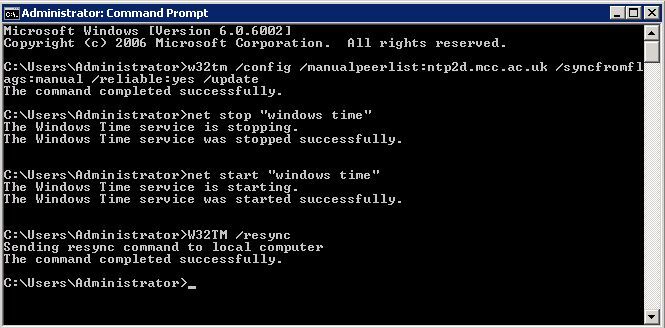
1. Log into the Server > Start > run > cmd {enter}
2. Issue the following four commands;
w32tm /config /manualpeerlist:ntp2d.mcc.ac.uk /syncfromflags:manual /reliable:yes /update {enter}
net stop "windows time" {enter}
net start "windows time" {enter}
W32TM /resync {enter}
Step 3 – Set up the AAA Kerberos in ASDM
1. Log into the ASDM.
2. Configuration > Remote Access VPN > AAA/Local Users > AAA Server Groups (top Section) > Add
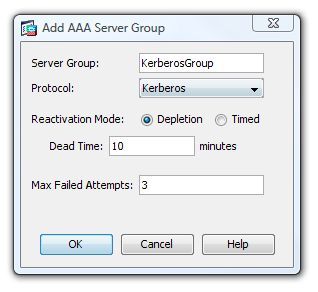
3. Give the Server group a name i.e. KerberosGroup > Change the protocol to “Kerberos” > OK.
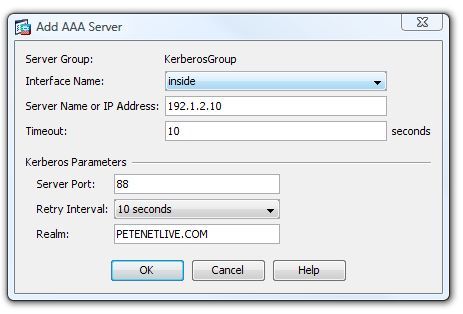
4. Move to the bottom section of the page (Servers In the Selected Group) > Add.
5. Enter the IP Address of the Domain Controller providing Authentication > In the Realm section enter the “Domain Realm.”
Note: To Find out the REALM, on the domain controller issue the following command;
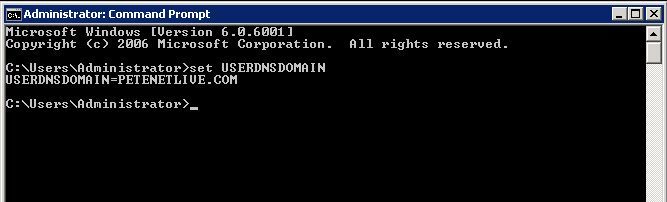
Note: enter the Realm “IN CAPITALS“
6. Click Apply > File > “Save running configuration to flash”.
To set up from Kerberos AAA command line
Petes-ASA>
Petes-ASA> enable
Password: ********
Petes-ASA# configure terminal
Petes-ASA(config)# aaa-server KerberosGroup protocol kerberos
Petes-ASA(config-aaa-server-group)# aaa-server KerberosGroup (inside) host 192.1.2.10
Petes-ASA(config-aaa-server-host)# kerberos-realm PETENETLIVE.COM
Petes-ASA(config-aaa-server-host)# exit
Petes-ASA(config)#
Step 5 – Test Kerberos Authentication
1. Log into the ASDM.
2. Configuration > Remote Access VPN > AAA/Local Users > AAA Server Groups (top Section) > Select the Kerberos Group.
3. In the bottom section click Test.
4. Enter the username and password > OK.
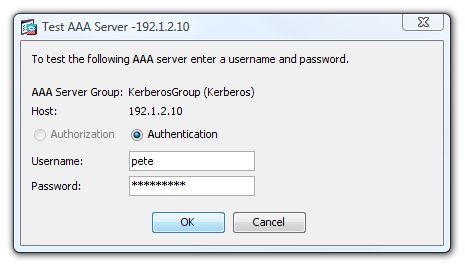
5. It should say that the test was successful.
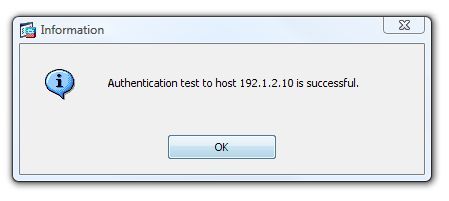
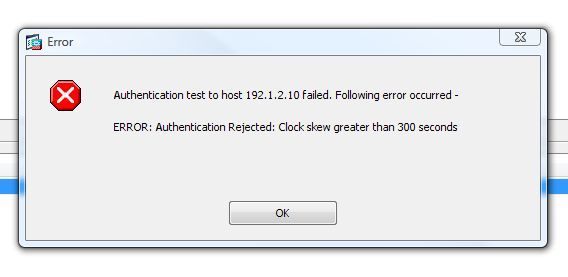
If It says “Error: Authentication Rejected: Clock skew greater than 300 Seconds” then steps 1 and 2 did not work.
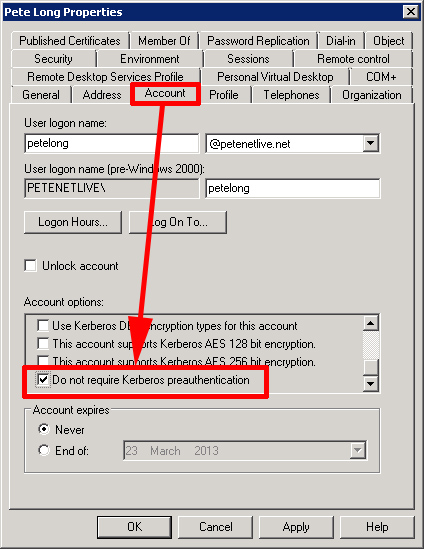
Kerberos Pre-Authentication
Also Note: You may need to turn of “Require pre-authentication” on a user by user basis. If so, log onto the domain controller > Start > Run > dsa.msc > Locate the user > Right Click > Properties > account > Account options (scroll down) > Select “Do Not require Kerberos preauthentication”.
Related Articles, References, Credits, or External Links
Thanks to Zsolt Horvath at Cisco TAC Cisco ASA – Configuring for NTP
