
KB ID 0000007
Problem
You want to wipe the firewall’s config and revert to the factory settings (passwords blank – management or inside set to 192.168.1.1 and DHCP enabled, with all other settings wiped).
Solution
1. Connect to the ASA via the console Cable. CLICK HERE
2. log in and go to configure terminal mode.
3. Execute the following command “config factory-default”
4. Press the space bar a few times to execute the commands.
5. When you get back to command prompt Execute the following command “reload save-config noconfirm” (Or on a Cisco PIX, write mem {enter} > reload {enter}{enter}).
6. The Firewall will reboot, (set to factory settings).
Procedure carried out on a Cisco ASA 5508-X (Running version 9)
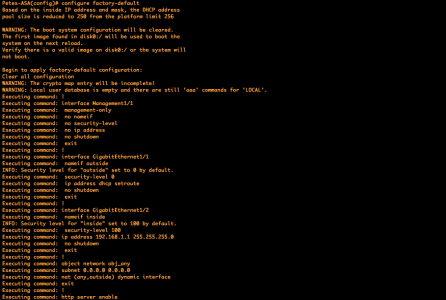
Procedure carried out on a Cisco PIX 515E (Running version 8)

Note: Now the management interface, (if you have one) will be set to lease DHCP addresses. If you don’t have a management interface, (i.e. you have an ASA 5505, or an older PIX,) then the inside interface will lease DHP addresses instead. The outside interface will be set to obtain its IP address via DHCP.
Related Articles, References, Credits, or External Links
Cisco ASA – Password Recovery / Reset
Cisco PIX (500 Series) Recovery
